 VOICE
VOICEBusiness basics
Legal/business name, trading identity, website, main numbers, opening hours and locations.
FROM YOUR PROCESS TO A WORKING VOICE SERVICE
Onboarding is where we turn your real call reasons, knowledge, systems and human responsibilities into a controlled Voice workflow. We do not publish a fixed build-time promise until the scope and integrations are understood.
THE CUSTOMER JOURNEY
Understand your calls, teams, systems, risks and what success should look like.
Configure greeting, knowledge, call journeys, actions, boundaries and human routes.
Test routine, unusual, failure and sensitive scenarios with your team.
Only approved journeys and verified connections move into live use.
Review outcomes and refine scripts, FAQs, routes and escalation based on real demand.
WHAT WE NEED FROM YOU
Legal/business name, trading identity, website, main numbers, opening hours and locations.
The most common reasons people phone and what should happen for each one.
FAQs, service information, opening rules and the things ARIA may explain confidently.
Teams, numbers and email routes for routine handover, urgent issues and exceptions.
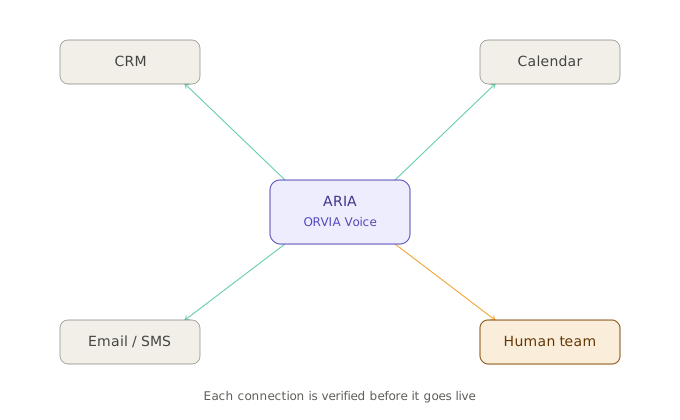
Calendars, CRM, email, SMS, telephony and specialist tools that may need connecting.
What ARIA must never decide, promise, approve or complete without a person.
BUILD
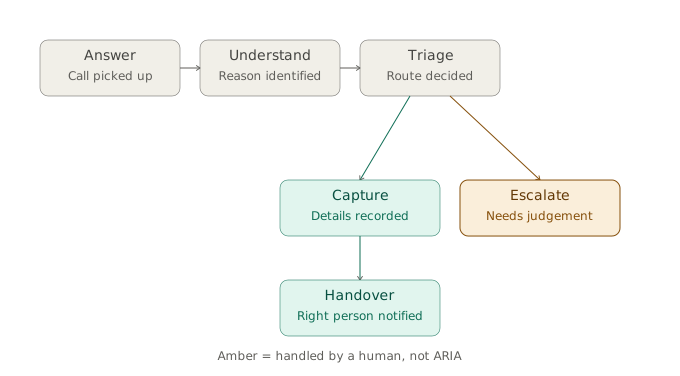
We start with why people call, what your team currently does next, which steps are repeatable and which require judgement. Then the conversation is designed around that process.
How ARIA introduces the organisation and its role.
The minimum approved information needed to move each journey forward.
Route, capture, book, notify, task or record — only where appropriate and verified.
What happens when ARIA cannot understand, a system is unavailable or the caller goes outside scope.
VISUAL MAP
EVALUATE
A happy-path demo is not enough. Evaluation should include normal calls, incomplete information, unusual requests, misunderstood answers, unavailable integrations and any sensitive scenarios relevant to the deployment.
Do the common call journeys reach the intended outcome?
Does ARIA clarify or hand over when information is ambiguous?
Does the system avoid claiming an action succeeded when a connection fails?
Do the right people receive the right context when a threshold is reached?
Does the assistant sound professional without misleading callers about its role?
The customer reviews the journey before it is represented as ready for live use.
GO-LIVE
A customer may begin with a smaller approved call flow and add more integrations later. The aim is a controlled launch, not claiming that every possible feature is active from day one.
The number routing or call path has been confirmed for the selected deployment.
Permissions, fields and failure behaviour have been tested for each active integration.
Human recipients know what they will receive and what actions remain their responsibility.
WHAT YOU RECEIVE
A defined set of reasons, questions, actions, limits and handovers for the deployment.
The agreed business information and FAQs ARIA is allowed to use.
Who receives routine, exceptional, sensitive and urgent handovers.
A distinction between what is active, what is not connected and what may be considered later.
COMMON QUESTIONS
The actual timeframe depends on the number of call journeys, integrations, telephony setup, customer access and testing. We confirm it after scoping rather than publishing an unsupported blanket promise.
No. We need accurate information and access to the people who understand the process. Part of onboarding is turning that knowledge into a structured call journey.
Yes. A deployment can start with one useful problem and expand as additional journeys and integrations are approved and tested.
Do not put passwords or API secrets into a general onboarding form. Where technical access is required, it should be provided through an appropriate secure connection or credential process.
Tell us what rings, what happens next and where a person still needs to own the decision.